


Kardia
4.75.88K Reviews
App Specs
- Version
- 5.61.0-8a9f62a8b9
- Updated On
- License
- Free
- Downloads
- 1,000,000+
- Developer
- AliveCor Inc.
- Categories
- Medical
- Platform
- Android, iOS
Screenshots
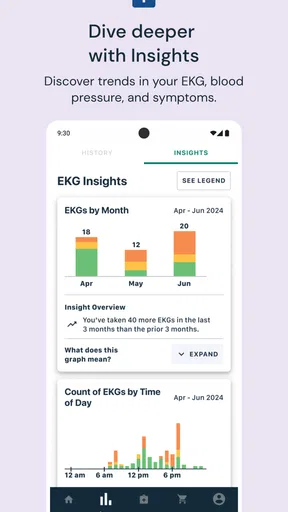
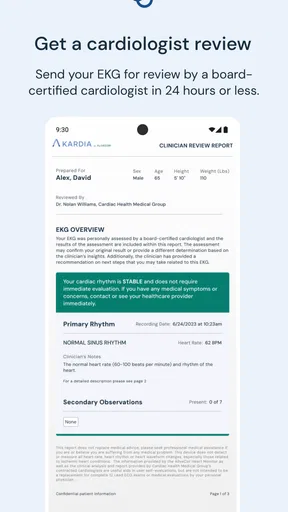
 Analysis by AppCompare
I’m interested in heart apps when they help turn a fleeting symptom into something I can discuss clearly with a clinician. Kardia is built around that idea: it works with a compatible recording device to capture an electrocardiogram at home, then keeps the result in the app. The useful part isn’t simply having another health screen to check. It’s being able to make a recording close to the moment I feel something unusual, rather than relying on memory later.
Why an at-home ECG can be useful
Many everyday heart-health tools focus on general activity or pulse trends. Kardia takes a narrower, more medical direction by recording an ECG through its paired device. That distinction matters if a clinician has asked you to keep track of particular symptoms or if you want a record to bring to an appointment. It is not a replacement for a clinician’s assessment, but it can help make a conversation more specific: when a sensation happened, what you noticed, and what the accompanying recording showed.
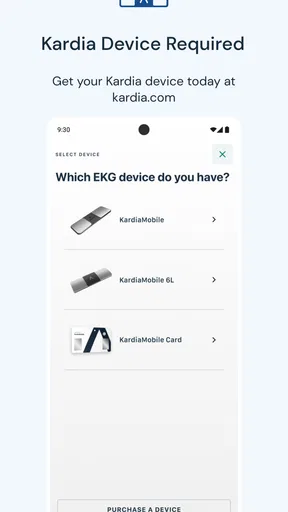
The app is a medical app from AliveCor Inc., and its central workflow is easier to understand than a dashboard full of unrelated wellness numbers. The current version is 5.54.1-dae4a07c68, and it is free to download. The companion hardware is an important part of the experience, though, so I would check that the device you intend to use is compatible before building a routine around the app. The software alone is not a way to take an ECG.
How I would use it in practice
Once the device is paired and the profile is set up, the basic process is to open the app, follow the recording instructions, and stay still long enough to make a clean reading. The original review describes holding the device with your fingers or placing it on your knee. In practical terms, a calm, consistent setup is more useful than trying to record while walking, talking, or rushing around. If the result looks unclear, I would first repeat the reading under steadier conditions rather than treating one imperfect capture as a conclusion.
One useful habit is to decide in advance where the device will live. A dedicated place at home makes it easier to find when symptoms occur and reduces the temptation to postpone a reading until the moment has passed. If you plan to use it away from home, think about whether you can sit quietly and follow the recording steps there. The ability to capture a reading in more than one setting is helpful only when the conditions are good enough to produce something worth reviewing.
The app’s symptom voice recording can add context that a bare ECG trace cannot provide on its own. I would use it to note what I felt and when, keeping the description plain rather than trying to diagnose myself. A short, consistent note—such as whether the sensation began at rest or during an activity—can be more useful at a follow-up than a long account written hours later. This is a small workflow detail, but it turns the record into a better prompt for a clinical discussion.
A realistic routine, not a constant check
Imagine noticing an unusual flutter while sitting at home after a busy day. Rather than repeatedly checking your pulse or searching online for an explanation, you can sit down, make a recording with the paired device, and add a voice note describing the sensation. Later, you can review the entry and share it with your healthcare provider. That sequence is the app’s strongest practical case: it can help preserve information from a particular moment, especially when the feeling has passed by the time an appointment arrives.
Worth Reading Before You Choose

Flipboard Shows What News Apps Must Do Beyond the Feed

Switching to Android Auto Means Rethinking Your Driving Routine

Google Calendar Makes a Crowded Week Easier to Manage

Ludo King Makes the Most of the Minutes Between Plans

Baby Panda World Brings Quick Play to Modern Phones, but Its Game Library Feels Busy

ESPN’s Live Game View Makes Following Close Games Easier
I would not turn that scenario into a reason to record every minor sensation. Frequent checking can make some people more anxious, and repeated readings do not necessarily answer what is causing a symptom. A more sensible approach is to follow the monitoring plan given by a healthcare professional, keep notes that matter to that plan, and use the app as a record rather than as a source of reassurance on demand.
What the results can and cannot tell you
Kardia provides an immediate result that can indicate whether a reading appears normal or whether atrial fibrillation has been detected. That speed is convenient, but the wording should not be mistaken for a complete medical verdict. A result is tied to the recording and to what the app can identify; it does not explain every possible cause of discomfort, and a normal-looking result does not rule out every heart problem. If symptoms are severe, new, or worrying, seeking appropriate medical care matters more than trying to obtain a reassuring app result.
This is also why I see the app as most useful when a clinician is already part of the process. Ask what kinds of recordings they want, how often they want them, and how they prefer to receive them. Sharing a focused set of relevant entries can make a consultation easier to prepare for than sending a large history without context. The app can support that exchange, but the clinician remains the person who interprets the information alongside symptoms and medical history.
Where it differs from everyday alternatives
A smartwatch or general fitness tracker is often better for people who want broad, passive activity information in the background. Kardia is more deliberate: you make a recording with its companion device when you choose to, rather than relying on a stream of everyday wellness data. That makes it less convenient for someone who wants one wearable to handle everything, but potentially more appropriate for someone whose clinician has recommended ECG recordings and who is prepared to use a separate device.
Compared with writing symptoms in a notebook, the app’s advantage is that it can keep the ECG and the accompanying note together, then make the history available to share. A notebook, on the other hand, needs no pairing or battery-powered accessory and may be enough if a clinician only wants a simple symptom diary. I would choose Kardia when the ECG itself is part of the monitoring plan, not merely because a digital log seems more sophisticated.
There is a practical trade-off in that extra hardware. You need to have the device with you, know how to position it, and give the reading your attention. That is a different kind of convenience from glancing at a wrist display. People who dislike handling small accessories, expect completely automatic monitoring, or do not have a reason to record ECGs may find a basic tracker or written log easier to maintain.
Who is likely to get the most from it
I think the best fit is someone who has been advised to monitor heart rhythms at home, wants to capture occasional symptoms, and is comfortable following a short recording routine. It may also suit a person who would rather bring a record to an appointment than rely on recollection alone. The app has a 4.7 average from around 51,000 ratings, and it has been installed over a million times, but popularity cannot tell you whether ECG monitoring is appropriate for your own situation.
It is available for everyone, and it supports devices running version 8.0 or later. Those details make it accessible to a broad range of users, but they do not remove the need to check that the phone and companion device work together. If you are helping a family member, I would walk through a practice recording with them before they need it. Learning the steps during a calm moment is easier than trying to troubleshoot pairing while someone feels unwell.
People who mainly want step counts, workouts, or passive wellness summaries may be better served by a fitness app or wearable they already use. Someone who is uncomfortable interpreting medical information may also prefer to keep monitoring clinician-directed and ask for help reviewing results. Kardia is most convincing when its focused ECG workflow meets a specific need, not when it is treated as an all-purpose health monitor.
Getting Started with Kardia
Getting started with Kardia is a breeze. You download it, set up your profile, and you're ready to roll. The app pairs with a small device that you can use to take medical-grade EKGs right from the comfort of your home. Seriously, it’s as simple as holding the device with your fingers or placing it on your knee. This simplicity makes it a game-changer for folks who need to monitor their heart regularly.
Features You’ll Love
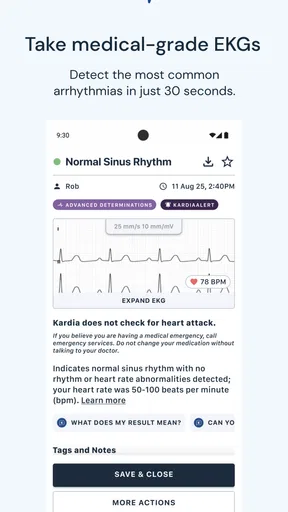
Kardia offers a bunch of features that make it stand out. For starters, it gives you instant results, letting you know if your EKG is normal or if atrial fibrillation is detected. Plus, it keeps a detailed history of all your readings, which you can easily share with your doctor. There’s also an option to voice-record your symptoms during each reading, providing a full picture of what’s going on when you’re feeling off.
- Instant EKG results
- Symptom tracking
- Easy sharing with your healthcare provider
Everyday Use and Interface
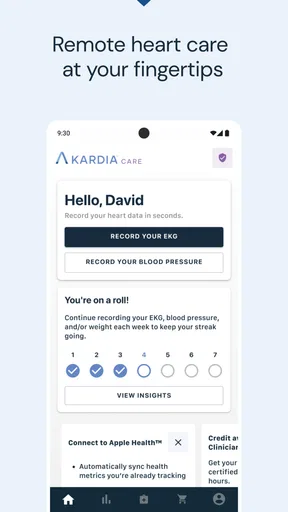
The interface is clean and intuitive. You don’t need to be a tech genius to figure out how to use it, which is a huge relief for those who might not be the most tech-savvy. The app is designed to make everything straightforward, from taking a reading to accessing your history and sending it off to your doctor.
And let’s talk about peace of mind—having the ability to check your heart’s status anytime, anywhere, is incredibly reassuring. Whether you’re at home, at work, or on the go, Kardia fits neatly into your routine without any hassle.
Final Thoughts
In a world where health is more important than ever, having a tool like Kardia at your fingertips is invaluable. It’s not just about the technology; it’s about empowering yourself to take charge of your health in an easy and accessible way. If you’re looking for a reliable companion to keep track of your heart health, this app might just be your new best friend.
So, would I recommend it? Absolutely. It’s simple, effective, and quite literally, a lifesaver. If you’re curious to try it out, head over to your app store and give it a go. Your heart will thank you!
Pros
- Intuitive interface for easy navigation.
- Real-time heart monitoring feature.
- Comprehensive health tracking options.
- Seamless integration with smart devices.
- Customizable alerts for heart health.
Cons
- Requires subscription for advanced features.
- Limited compatibility with older devices.
- Battery drain with prolonged use.
- Occasional syncing issues reported.
- Data export options are somewhat limited.
FAQs for Kardia
What is Kardia and what does it offer?
Kardia is a health-focused app designed to monitor heart health and track vital signs. It offers features like ECG recording, heart rate monitoring, and integration with wearable devices. Users can store, review, and share their health data with medical professionals, making it a comprehensive tool for managing cardiovascular health.
Is Kardia compatible with all mobile devices?
Kardia is available for both Android and iOS platforms, but compatibility may vary depending on the specific model and operating system version. It's essential to check the app's requirements on the Google Play Store or Apple App Store to ensure it works with your device before downloading.
Does Kardia require any additional hardware?
Yes, to fully utilize Kardia's features, additional hardware like the KardiaMobile or KardiaBand may be required. These devices allow users to record ECGs and other vital signs. Without these accessories, the app's functionality may be limited to basic tracking and data storage.
How secure is the data stored in Kardia?
Kardia prioritizes user privacy and data security by implementing strong encryption protocols. Users can rest assured that their health information is stored securely. Moreover, data can only be shared with healthcare providers or others with the user's explicit consent, ensuring control over personal information.
What are the subscription options available for Kardia?
Kardia offers both free and premium subscription options. The free version provides basic monitoring features, while the premium subscription unlocks advanced analytics, personalized health insights, and the ability to store unlimited ECGs. Users can choose the plan that best suits their health management needs.


